Fw: [測試] AMD RADEON R7 SSD 240GB
※ [本文轉錄自 PC_Shopping 看板 #1Jy_EwW8 ]
完整版
http://www.pcdvd.com.tw/showthread.php?p=1084820354
--
http://shadowsfalltw.gjisland.net/pic/amdr7ssd/DSC_1330.JPG


Radeon R7 SSD 目前提供 120GB、240GB、480GB 三種不同的容量,性能方面會依照使用
的顆粒數量有些不同,但大體上算是相當接近,另外也提供了 Acronis True Image HD
備份軟體。接下來將針對 240GB 的Radeon R7 SSD 進行一系列的開箱與測試。
http://shadowsfalltw.gjisland.net/pic/amdr7ssd/amdpress4.JPG


產品外盒:一如 AMD 的紅黑配色,也放入了 Radeon SSD 的LOGO 。
http://shadowsfalltw.gjisland.net/pic/amdr7ssd/DSC_1336.jpg

配件一覽:如同 Vector 150,除了轉接架以外,也提供了一張 Acronis True Image HD
的序號卡。
http://shadowsfalltw.gjisland.net/pic/amdr7ssd/DSC_1344.JPG

SSD 背面與舊版 Vertex 4 比較,不同時代的 OCZ 所使用的貼紙也有所不同。
http://shadowsfalltw.gjisland.net/pic/amdr7ssd/DSC_1350.JPG


拆開 SSD 本體:一如我們所熟知的 OCZ 設計風格,內側的接腳是供工廠治具進行初始化
或是診斷用。解熱是利用導熱貼將主控的熱量導到外殼。
http://shadowsfalltw.gjisland.net/pic/amdr7ssd/DSC_1354.JPG

主控使用型號為 IDX500M00-B,也就是 Barefoot 3 M00 版:
http://shadowsfalltw.gjisland.net/pic/amdr7ssd/DSC_1356.JPG
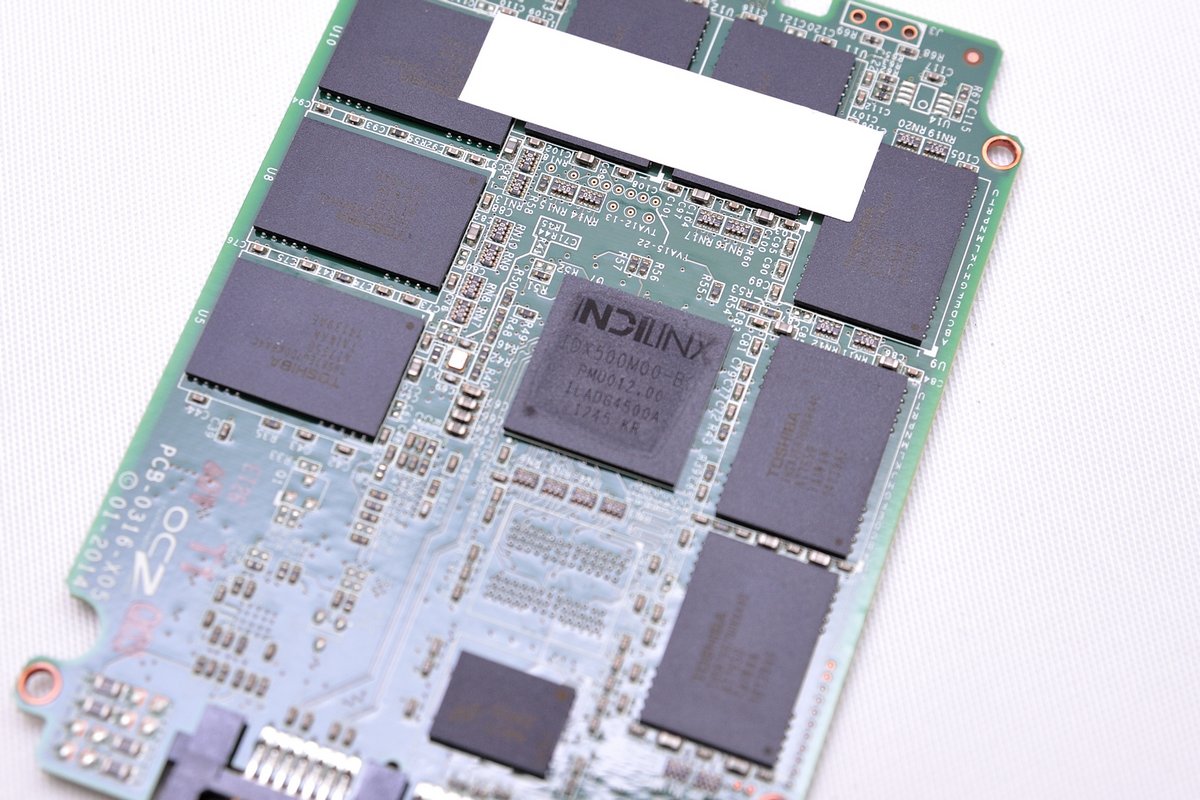
快取使用美光 D9PSH DDR3-1600 :
http://shadowsfalltw.gjisland.net/pic/amdr7ssd/DSC_1366.JPG

NAND FLASH 顆粒為 Toshiba 製TH58TEG7DDJBA4C A19 toggle 2.0 MLC:
http://shadowsfalltw.gjisland.net/pic/amdr7ssd/DSC_1367.JPG

PCB 背面同樣有一顆快取記憶體以及八顆 NAND FLASH
http://shadowsfalltw.gjisland.net/pic/amdr7ssd/DSC_1368.JPG

電源穩壓 IC 使用 TI TPS652510,搭配Richtek RT8070 兩顆 STEP-DOWN :
http://shadowsfalltw.gjisland.net/pic/amdr7ssd/DSC_1369.JPG


測試的部分,使用幾種常用的測試工具來進行測試,使用 Intel Z97 晶片組來當作這次
測試的基準平台,另外我們會以空碟與系統碟模式來進行不同環境下的測試。當然實際上
的測試結果,會依平台、環境的設定不同而有所出入,測試僅供參考是否偏離廠商標稱數
值太遠。
http://shadowsfalltw.gjisland.net/pic/amdr7ssd/os.JPG

使用非壓縮樣本的 AS SSD Bench:
http://shadowsfalltw.gjisland.net/pic/amdr7ssd/asssd.JPG

Crystal Disk Mark:
http://shadowsfalltw.gjisland.net/pic/amdr7ssd/crd.JPG

ATTO:特別一提的是,這是 OCZ 用來驗證最大讀寫性能的軟體,可以看到在這測試中,
R7 SSD 順利無誤的跑到標稱的 550/530 MB/s
http://shadowsfalltw.gjisland.net/pic/amdr7ssd/atto.JPG

Anvil's Storage Utilities:這邊設定的環境為 46%,也就是有54%資料是可壓縮。
http://shadowsfalltw.gjisland.net/pic/amdr7ssd/anvilset.JPG


AJA STSTEM TEST:模擬影像串流檔的讀寫環境。
http://shadowsfalltw.gjisland.net/pic/amdr7ssd/aja.JPG

接下來將平常測試環境直接複製到 R7 SSD 上,內容物除了 Windows 系統檔案本身之外
,還有一些零碎的過往測試數據與截圖、以及4套左右的單機遊戲,總共佔用了 57.9% 的
容量,用來模擬日常玩家的的環境應該還算可以接受。
AS SSD BENCH:
http://shadowsfalltw.gjisland.net/pic/amdr7ssd/osasssd.JPG

Crystal Disk Mark:
http://shadowsfalltw.gjisland.net/pic/amdr7ssd/oscrd.JPG


Anvil's Storage Utilities:
http://shadowsfalltw.gjisland.net/pic/amdr7ssd/osanvil.JPG

另外戰一下開機,使用 BOOTRACER紀錄,在第一次重開機之後,反覆操作便已有相當穩定
的表現。
http://shadowsfalltw.gjisland.net/pic/amdr7ssd/bootrace.JPG

--
Vector 150 特仕版(?
※ 編輯: ang728 (140.135.9.146), 08/20/2014 09:12:24
※ 編輯: ang728 (140.135.9.146), 08/20/2014 09:35:11
推
08/20 10:09, , 1F
08/20 10:09, 1F
推
08/20 10:28, , 2F
08/20 10:28, 2F
推
08/20 10:51, , 3F
08/20 10:51, 3F
推
08/20 11:04, , 4F
08/20 11:04, 4F
推
08/20 16:53, , 5F
08/20 16:53, 5F
→
08/20 20:11, , 6F
08/20 20:11, 6F
推
08/21 00:53, , 7F
08/21 00:53, 7F
推
09/01 03:29, , 8F
09/01 03:29, 8F
Storage_Zone 近期熱門文章


PTT數位生活區 即時熱門文章
