[軟體] EQSecure 4.0 Beta3 免安裝版+沙箱規則
使用方法:
1.如果之前用過 EQSecure,請先關閉EQ,開始->執行->
輸入 sc delete eqservice->重開機
2.雙擊執行 EQSecure.reg
3.雙擊執行 EQSysSecure.exe
4.啟動完成
5.已經內置到沙箱的程序
------------------------------
(1)瀏覽器:lolifox.exe、KapikoLauncher.exe、KAPIKO.exe、TTraveler.exe、
SeaMonkey.exe、Orca.exe、netscape.exe、miniie.exe、MaxFox.exe、
Avant.exe、Sleipnir.exe、safari.exe、GreenBrowser.exe、
FeedDemon.exe、theworld.exe、PCMan.exe、firefox.exe、KKMAN.exe、
maxthon.exe、k-meleon.exe、navigator.exe、opera.exe、iexplore.exe
(2)收信軟體:foxmail.exe、WinMail.exe、OUTLOOK.EXE、DM2005.exe、
thunderbird.exe、wlmail.exe、msimn.exe
(3)IM軟體:Shutter.exe、BaiduHi.exe、MIM32.exe、FetionVM.exe、
GoogleTalkLabsEdition.exe、psi.exe、Pandion.exe、skypePM.exe、
googletalk.exe、pidgin.exe、miranda32.exe、skype.exe、uc.exe、
WangWang.exe、msmsgs.exe、msnmsgr.exe、YahooMessenger.exe、QQ.exe、
TM.exe
(4)其他:%WinDir%\system32\tftp.exe、%windir%\hh.exe
---------------------------
設定:
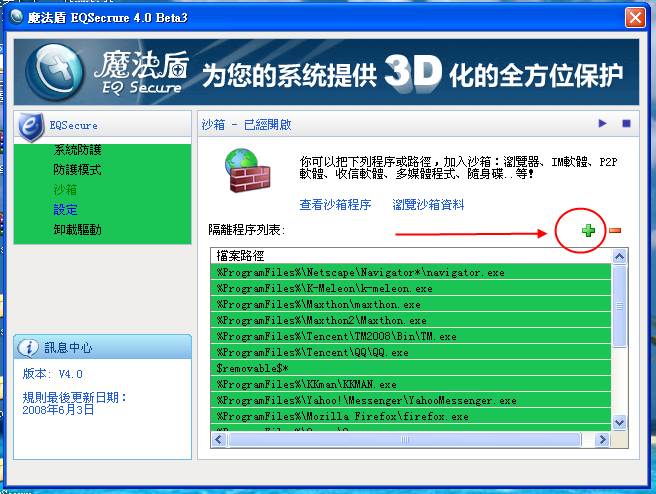
1.可以在下圖的"綠+"添加要進沙箱的程序或路徑
2.請把 USB隨身碟路徑 加進去,例: F:\*
http://i234.photobucket.com/albums/ee153/a256886572008/sr/eq2.png
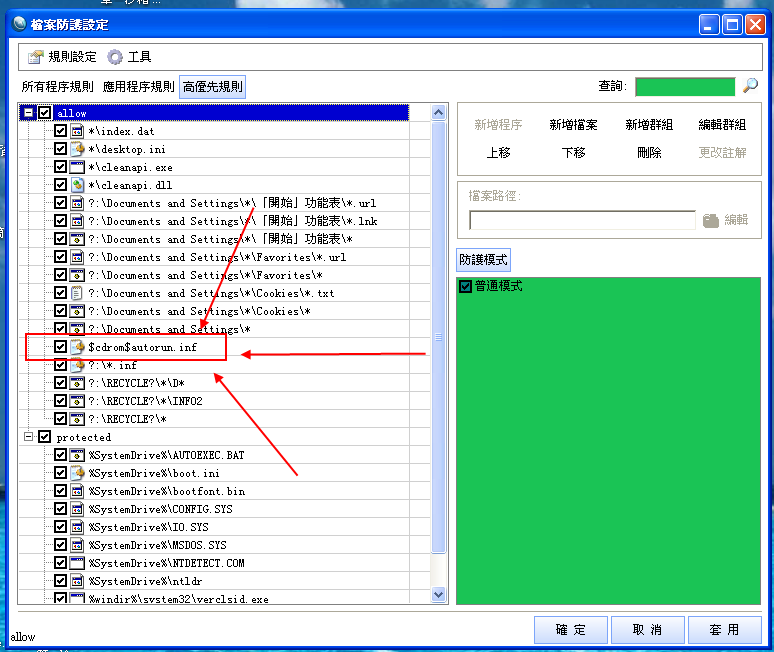
3.工作列 EQSecure圖示-> 右鍵 自定義設定 -> 檔案防護 -> 高優先規則
把下圖中的 $cdrom$autorun.inf 改成自己的 光碟路徑,例:E:\autorun.inf
4.簡體中文,請把 「開始」功能表,改成 「開始」菜單
http://i234.photobucket.com/albums/ee153/a256886572008/sr/eq1-7.png
載點:
正體中文版:
http://www.badongo.com/file/9750364
簡體中文版:
http://www.fs2you.com/files/3f88af19-336d-11dd-8e1f-00142218fc6e/
--
※ 發信站: 批踢踢實業坊(ptt.cc)
◆ From: 122.120.43.247
推
06/08 23:58, , 1F
06/08 23:58, 1F
噓
06/11 01:00, , 2F
06/11 01:00, 2F
推
06/11 15:45, , 3F
06/11 15:45, 3F
EZsoft 近期熱門文章
PTT數位生活區 即時熱門文章
